English
Feature Overview
A high-level tour of everything NavSlides Editor can do.
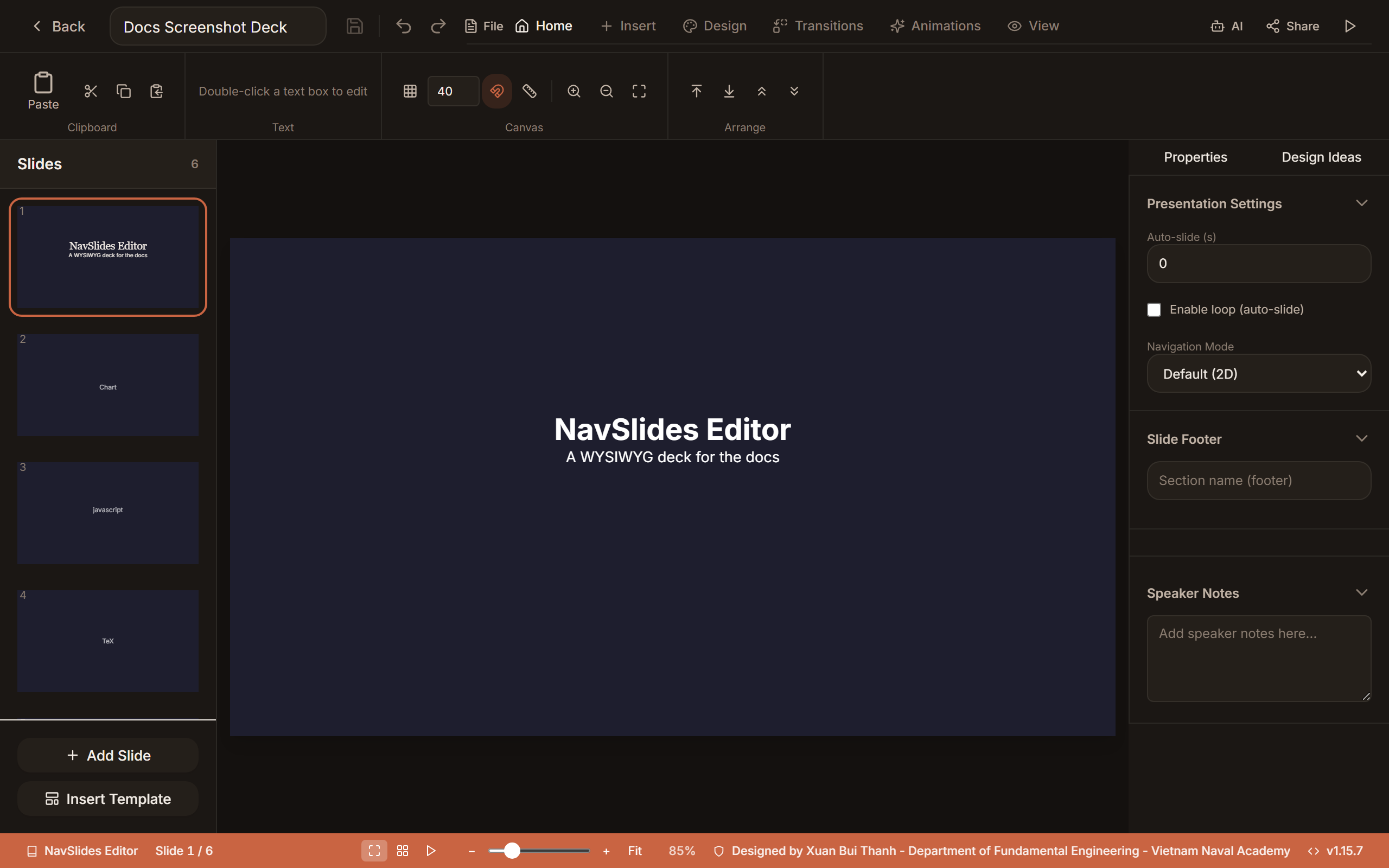
Editing
NavSlides Editor is built around a drag-and-drop canvas. Every element on a slide — text boxes, images, shapes, code blocks, LaTeX blocks, charts — can be:
- Clicked to select and dragged to reposition
- Resized by dragging corner or edge handles (hold
Shiftto lock aspect ratio) - Rotated by dragging the rotation handle above the element (hold
Shiftto snap to 15°) - Layered using bring-forward / send-backward controls
- Aligned with the built-in alignment toolbar
An undo/redo stack tracks every change (Ctrl+Z / Ctrl+Y).
Element Types
NavSlides Editor has 19 canonical element types. The Insert ribbon shows 30+ actions because shapes (rectangle, circle, triangle, arrow, star), technical symbol packs, and games (10 variants) expose sub-variants from existing element types.
| Element | Description |
|---|---|
| Text | Rich text with TipTap — headings, bold/italic/underline, font size & color, lists, tables, inline math |
| Image | Upload or paste images; crop, filters, rounded corners; resize and reposition freely |
| Shape | Rectangle, circle, triangle, arrow, star — filled or outlined, any color |
| Code | Syntax-highlighted code; 10 themes, 25+ languages |
| LaTeX / TikZ | Display math and TikZ diagrams (KaTeX + TikZJax) with live split-pane preview |
| HTML | Iframe-isolated HTML embeds for interactive web content |
| Markdown | Markdown blocks rendered to HTML |
| Chart | Chart.js charts — bar, line, pie, doughnut, radar, polar area |
| Video | Local or URL video with start/end trim and playback speed |
| Audio | Audio clips with playback controls |
| Table | Drag-resize columns/rows, inline editing, per-cell styling, merged cells |
| QR code | Generate a QR code from any URL or text |
| Icon | 60+ Lucide icons, recolorable |
| Callout | Numbered callout markers for annotations |
| Drawing | Freehand pen strokes on the canvas |
| Line | Straight or curved connectors with arrowheads |
| SVG | Inline SVG with fill/stroke overrides |
| Timeline | Date-based timeline with events |
| Game | 10 interactive game types (name picker, hot potato, Jeopardy, four corners, relay race, trivia champ, scattergories, live poll, word cloud, matching) |
The canonical list lives in client/src/data/element-defaults.js.
TIP
To insert an element, use the Insert tab in the ribbon at the top of the editor, or right-click on the slide canvas. Teaching tools are visible there: Mermaid, STEM simulation, LaTeX / TikZ, Technical symbols, and Games.
Slides
- Add, duplicate, delete slides from the panel on the left
- Reorder by drag-and-drop in the panel
- First-class vertical (child) slides — create, select, edit, and export nested slides directly from the slide panel for reveal.js-style vertical navigation
- 35 layouts across 6 categories (basic, content, layout, data, structure, ending), plus 20+ full-deck templates including interactive simulations and quiz decks
- Per-slide background — solid color, gradient, image, or animated FX
- Speaker notes — each slide has an optional notes pane visible in presenter mode
- Fragment animations with a visual timeline editor and preview modal
- Slide transitions — choose from reveal.js transitions (fade, slide, zoom, convex, concave, none)
- Hidden slides, per-slide page numbers, and a footer system (basic / sequence modes)
Animated FX Backgrounds
Set a slide background to type: fx for one of 8 animated canvas effects: gradient-blob, starfield, matrix-rain, constellation, particle-burst, knowledge-graph, orbit-ring, sparkle-trail. They animate in the editor, present, and live views, honor prefers-reduced-motion, and fall back to a solid color when printed.
Game Mode
Run 10 interactive game element types — name picker, hot potato, Jeopardy, four corners, relay race, trivia champ, scattergories, live poll, word cloud, and matching — with a dedicated player join page, leaderboard, scoring, and presenter shortcuts. See Game Mode.
Footer System
The footer system lets you define a section sequence shown at the bottom of every slide — useful for academic talks.
- Define named sections (e.g., Introduction, Methods, Results, Discussion)
- Each section's progress dot highlights as you advance through slides
- Customizable font, size, and color to match your theme
Themes & Templates
- 11 built-in reveal.js themes: Black, White, League, Beige, Sky, Night, Serif, Simple, Solarized, Moon, Dracula
- 39 token-based design presets across 7 categories (minimal, editorial, developer, corporate, creative, earthy, bold), surfaced in the Design ribbon's ThemeGallery with live-switch and "Apply to all"
- 6 transitions: none, fade, slide, convex, concave, zoom
- Design Ideas panel — heuristic layout and theme suggestions (no AI)
- Custom templates: Save any slide as a reusable template to re-use across presentations
- Per-slide overrides: Change the background or theme tokens on individual slides without affecting the rest of the deck
TIP
Design presets apply a coordinated color palette, font stack, and default element styles all at once — great for getting a polished look quickly.
Export & Sharing
- Standalone HTML — a single
.htmlfile that plays reveal.js from CDN - Offline HTML — all CDN assets inlined; works without internet access
- PDF — print-ready via browser print dialog with all fragments expanded
- PPTX — PowerPoint-compatible export
- Shareable link — generate a URL to share a read-only or editable view
- GitHub push — commit your presentation directly to a GitHub repository
See Export & Sharing for details.
Cloud Sync
Sync your presentations folder to a remote storage provider using rclone:
- Proton Drive — first-class support with guided setup
- S3-compatible — AWS S3, Backblaze B2, Cloudflare R2, MinIO
- Google Drive, Dropbox — via standard rclone remotes
- Manual sync or automatic background sync at a configurable interval
Version History
NavSlides Editor maintains a local version history for each presentation:
- Automatic snapshots on save
- Browse and restore any previous version
- Diff view shows which slides changed between versions